
How a flow works
A flow is a tree of automations. The first starts from an event or Run now; each later one starts when its parent completes or fails on the same version, if its If holds. An If can check app or service, level (optionally only when the version moves to it), tags, environment, specific apps or services, and the parent’s outputs.What starts a flow
The builder lists the events a flow can start from, such as a version pushed or a feature submitted for review. An event-started flow acts as the Console; Run now acts as you.Steps
Do steps
Agent reads the version’s code in a sandbox and returns typed outputs: tag verdicts, yes or no, a choice, a number or text. Add a tag adds a tag to the version.Decide steps
Decide steps settle something an event is waiting on, like a pushed version waiting for release: Require sign-off with reviewer rules, Block the version, or Approve it automatically. This is how each level gets its review.Agents
Each agent step gets its own sandbox and a token that works only for that step. It can list, read and search the version’s source, read the organization’s tags, ask the version’s authors questions if the step allows, and report outputs. It can’t change code, push versions or deploy. For tags, the agent gives a verdict per tag with a reason and the lines of code that show it. The Console checks every cited line against the version and sends the report back if one isn’t there.
Spend is checked before each model call. An agent can ask up to 3 rounds of up to 20 questions, and the step sets whether it waits for answers, keeps going, or doesn’t ask. Answers stick until the code they were about changes.
Run now
Run now first shows what the first automation matches right now (each app or service, its version, and a count), up to 200 per run. Starting it takes each through the flow, and an automation that skips says why. Tags it adds are recorded as proposed and set the version’s level.Runs
Pick an app or service in a run to see each automation’s status, summary and outputs, the cost, and each tag verdict with its reason and code evidence. From a run you can Retry failed, Re-run or Cancel.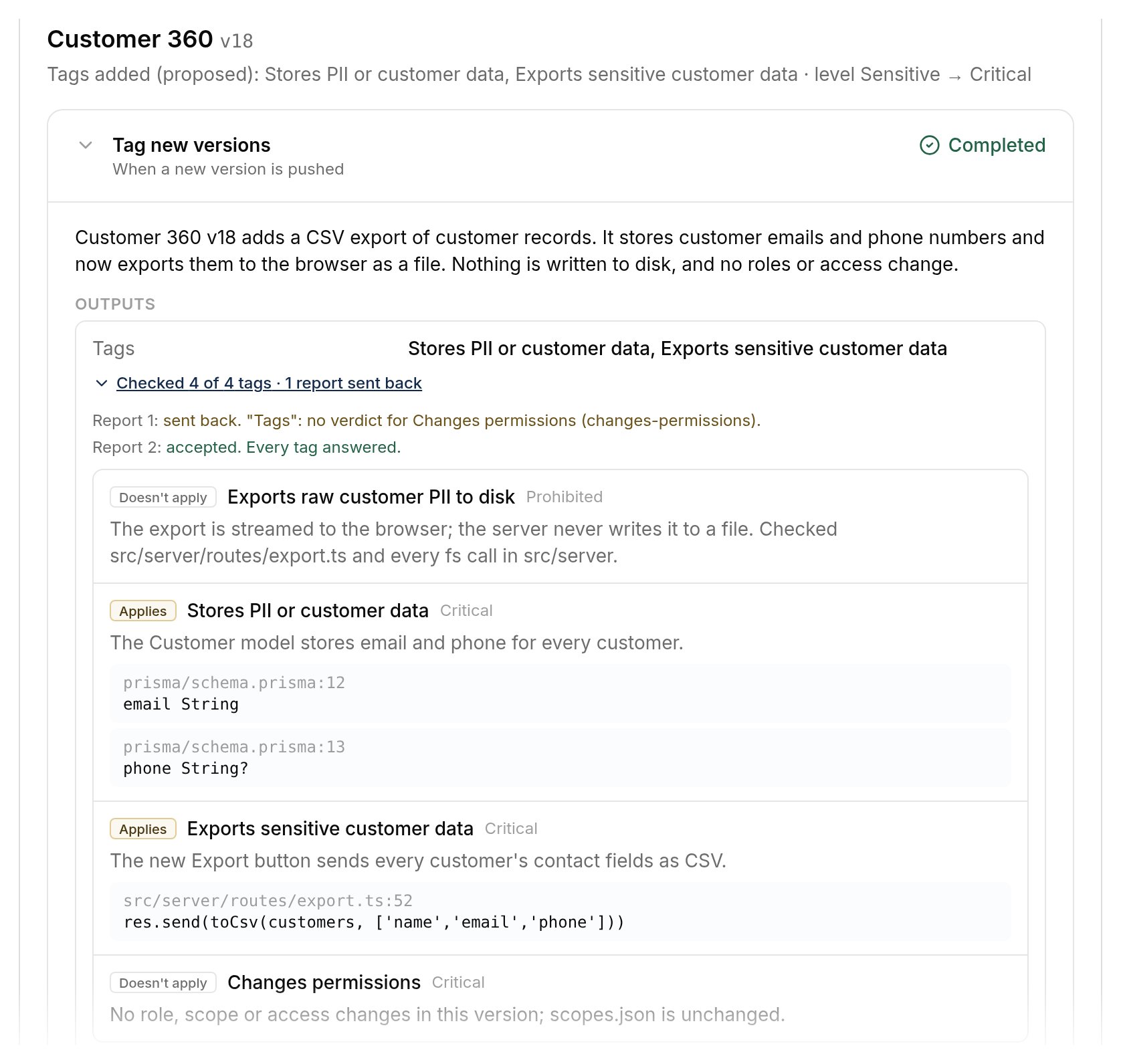
One run on a version: each tag's verdict with the reason and code that show it.
Events
Automations › Events lists every event received and what it did: started a run of each matching flow, decided a sign-off, or why nothing ran. Each event is handled once however many times it arrives. People who manage governance can Send a test event, which reaches flows exactly as a Platform event would.Who owns a flow
A flow belongs to the organization, a team, or one app or service. Managing the organization’s flows needsgovernance:manage or org:settings.
Every flow change is reviewed before it goes live, by another team member, a contributor or someone who manages governance. Only people who manage governance can approve their own change, and the review records it as self-approved. Pending changes show under Automation changes in Reviews.